
Скачать SolarSeek – Бесплатный клиент SoulSeek для Mac для безопасного обмена музыкой
Обзор
SolarSeek — специально разработанный клиент SoulSeek, который приносит классический опыт обмена музыкой по принципу peer‑to‑peer пользователям macOS с чистым, современным интерфейсом. Хотя оригинальная сеть SoulSeek существует более десяти лет, её популярность снизилась с появлением новых стриминговых платформ. Тем не менее сообщество остаётся живым, особенно среди коллекционеров, независимых артистов и аудиофилов, ценящих файлы высокого качества без потерь и возможность находить редкие треки, недоступные в основных сервисах. SolarSeek служит шлюзом для пользователей Mac, позволяя им подключиться к этой нишевой экосистеме без необходимости возиться со старыми клиентами только для Windows или инструментами командной строки.
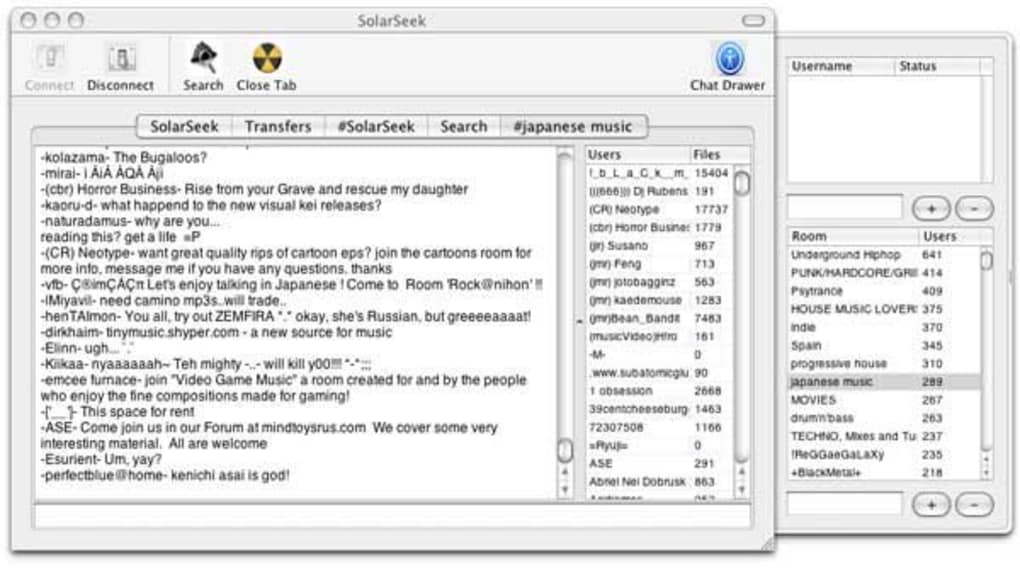
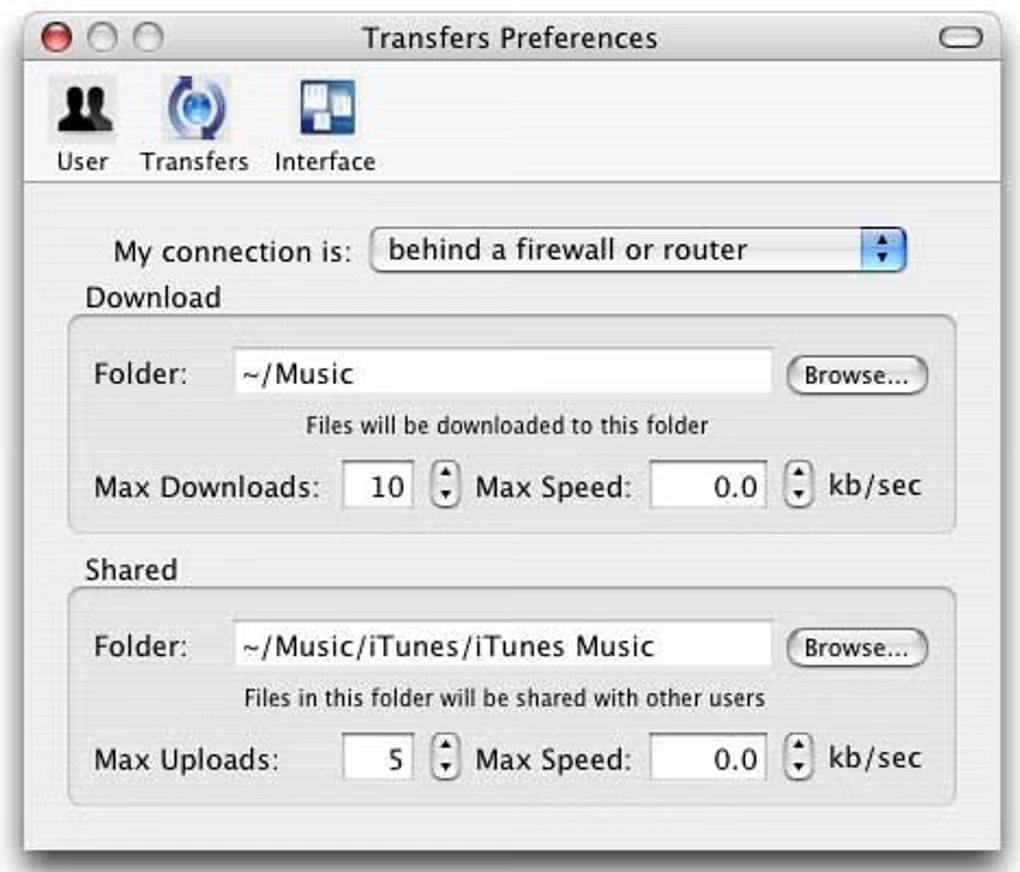
С момента запуска SolarSeek приложение проводит вас через основные шаги настройки: открытие необходимых портов, выбор папок для загрузок и выгрузок, а также настройку пользовательского профиля. Интерфейс размещает строку поиска в левом верхнем углу, повторяя знакомую компоновку многих Mac‑приложений, что делает её интуитивно понятной для новичков. Под строкой поиска находится панель, отображающая активные загрузки, текущие выгрузки и потоковую ленту чатов сети в реальном времени. Такой дизайн держит вас в курсе состояния передач и поощряет взаимодействие с сообществом.
Одним из самых привлекательных аспектов SolarSeek является акцент на сообществе. Списки друзей, личные сообщения и публичные чаты интегрированы непосредственно в клиент, позволяя обсуждать любимые группы, запрашивать конкретные треки или просто болтать о последних музыкальных тенденциях. Функция чата удивительно оживлённая; многие пользователи сообщают, что проводят часы, обмениваясь рекомендациями, открывая скрытые жемчужины и заводя долгосрочные дружбы, основанные на общем музыкальном вкусе.
Хотя SolarSeek не получал крупного обновления в последние месяцы, команда разработчиков анонсировала работу над версией 1.0, обещающей улучшения стабильности, обновлённый интерфейс и дополнительные возможности настройки. Первые бета‑тестеры уже отметили, что предстоящая сборка решит частые проблемы с падениями и упростит процесс проброса портов, делая клиент более надёжным для ежедневного использования. Для тех, кто ценит бесплатный, безопасный и ориентированный на сообщество инструмент обмена музыкой на macOS, SolarSeek остаётся сильным претендентом.
Ключевые функции
- Native macOS Design: Built from the ground up for macOS, SolarSeek adopts Apple’s design language, offering a responsive UI that feels right at home on your MacBook or iMac.
- Integrated Search Engine: A powerful search box lets you locate tracks, albums, or entire libraries instantly, with filters for file type, bitrate, and user rating.
- Real‑Time Chat Rooms: Join genre‑specific chat rooms, private message friends, or start a new conversation to discuss new releases and hidden gems.
- Automatic Port Configuration: The first‑time wizard detects your network setup and guides you through opening the necessary ports, reducing the typical P2P headache.
- Upload & Download Management: Queue multiple files, set bandwidth limits, and prioritize downloads directly from the dashboard.
- Secure User Profiles: Create a unique username, set a profile picture, and manage privacy settings to control who can see your shared folders.
- Community‑Driven Recommendations: Built‑in “Suggestions” feature highlights tracks your friends have uploaded or recommended, helping you discover new music organically.
- Cross‑Platform Compatibility: While SolarSeek runs on macOS, it can connect seamlessly with Windows, Linux, and Android SoulSeek clients, ensuring you can share with any user on the network.
- Free & Open‑Source Core: The application is free to download and use, with no hidden subscription fees, making it accessible for hobbyists and power users alike.
- Future‑Ready Updates: Upcoming version 1.0 promises performance patches, a more stable connection engine, and UI customizations based on community feedback.
Each of these features has been carefully crafted to balance simplicity with the depth required by seasoned SoulSeek veterans. Whether you’re just starting your music‑sharing journey or you’ve been swapping FLAC files for years, SolarSeek offers a reliable, user‑friendly platform that respects both your time and your music collection.
Установка и первый запуск
Скачивание установщика
To begin, visit the official SolarSeek website and click the “Download for macOS” button. The installer is a signed .dmg file, ensuring that macOS Gatekeeper recognises it as safe. After the download completes, double‑click the .dmg to mount the disk image, then drag the SolarSeek icon into your Applications folder. macOS may prompt you to confirm that you want to open an app from an unidentified developer; simply click “Open” after verifying the source.
Initial Setup Wizard
When you launch SolarSeek for the first time, a setup wizard appears. This wizard walks you through three critical steps:
- Port Forwarding: SolarSeek checks your router’s configuration using UPnP. If it detects closed ports, it offers to open the default SoulSeek ports (2234 TCP/UDP). You can also manually enter port numbers if you prefer a custom setup.
- Shared Folder Selection: Choose one or more directories that will serve as your upload library. The wizard recommends a folder with music files already organized by artist/album, but you can select any location on your Mac.
- User Profile Creation: Enter a username, optionally upload an avatar, and set your status message. This information is visible to other users and helps you build a recognizable presence on the network.
Connecting to the SoulSeek Network
After completing the wizard, SolarSeek automatically connects to the SoulSeek master server. You’ll see a green indicator confirming a successful connection. If you encounter connection problems, the “Network Diagnostics” panel offers detailed logs and suggestions, such as checking firewall rules or verifying that your ISP does not block P2P traffic.
Searching and Downloading
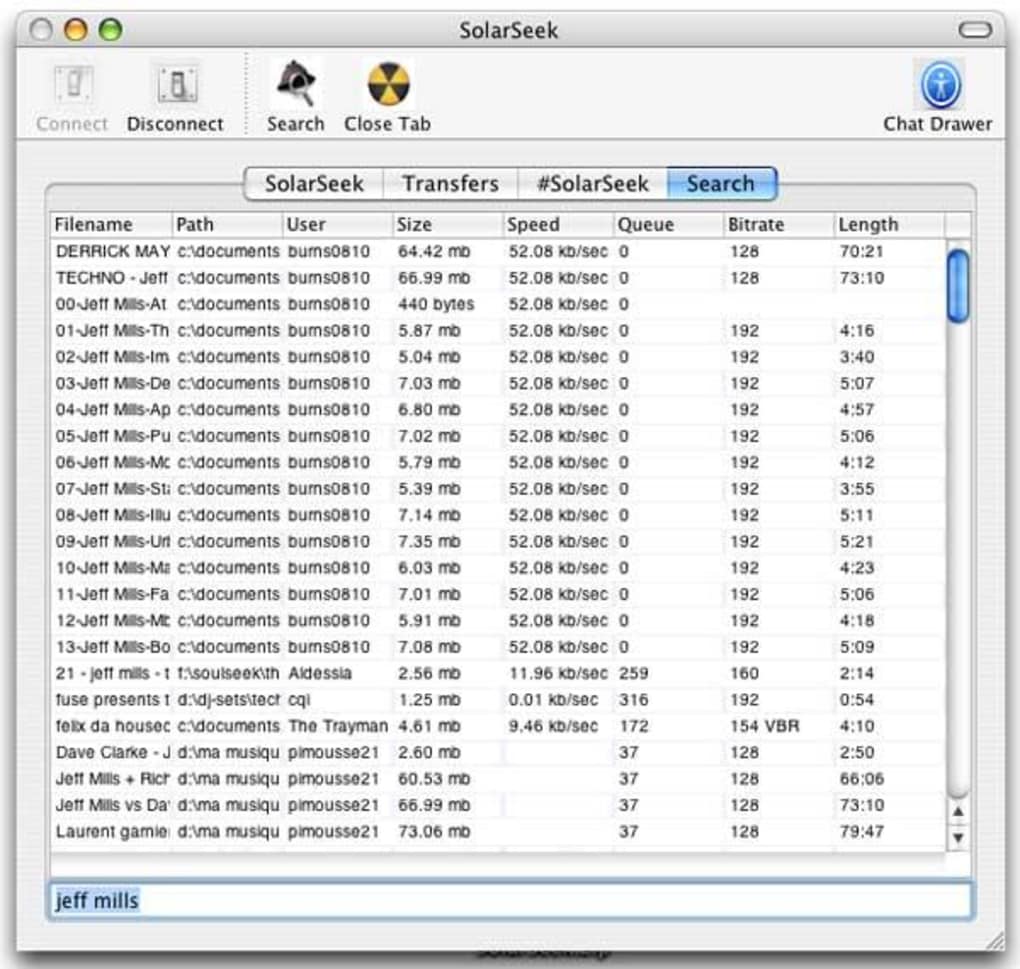
With the client connected, you can start searching for music using the search bar at the top left. Type an artist name, album title, or even a specific track name. The results list shows the file name, bitrate, file size, and the user who is sharing it. Clicking on a result opens a preview window where you can view the uploader’s profile, read any comments they’ve left, and add the file to your download queue.
Uploading and Sharing
SolarSeek automatically indexes the folders you selected during setup. Files that are ready to share appear under the “Uploads” tab. You can fine‑tune which files are visible to the community by toggling a “Hide from search” checkbox next to each track. Bandwidth throttling options let you allocate a maximum upload speed, ensuring your internet connection remains usable for other tasks.
Overall, the installation and first‑time experience is designed to be frictionless. By automating the most technical aspects—port forwarding, folder indexing, and user profile creation—SolarSeek lets you focus on what matters most: discovering and sharing music.
Совместимость, плюсы и минусы
Поддержка операционных систем
SolarSeek is optimized for macOS 10.13 (High Sierra) and later. The application runs natively on Intel‑based Macs as well as Apple Silicon (M1/M2) devices, thanks to Apple’s Rosetta 2 translation layer when necessary. While the core client is macOS‑only, it communicates flawlessly with SoulSeek users on Windows, Linux, Android, and iOS, ensuring a seamless cross‑platform experience. Users on older macOS versions may encounter limited functionality, particularly with the latest UI enhancements, so an upgrade to at least macOS Catalina is recommended for the best performance.
Плюсы
- Native macOS look and feel makes navigation intuitive.
- Automatic port configuration reduces technical barriers.
- Robust chat system fosters a vibrant community.
- Free to download with no hidden subscription costs.
- Supports high‑quality lossless formats (FLAC, ALAC) for audiophiles.
- Cross‑platform connectivity ensures you can share with any SoulSeek user.
- Upcoming version 1.0 promises stability fixes and UI enhancements.
Минусы
- The current stable release (0.9) can be unstable on certain network configurations, leading to occasional crashes.
- Limited customization options compared to some Windows clients.
- No built‑in media player; you need an external app to preview tracks.
- Updates are infrequent, which may concern users who prefer rapid feature rollouts.
- Port forwarding may still require manual router access for users with strict firewalls.
Despite these drawbacks, the overall value proposition of SolarSeek remains strong for Mac users who want a free, community‑driven music‑sharing tool. The pros outweigh the cons, especially when considering the vibrant chat rooms and the ease of getting started without deep technical knowledge.
FAQ & Final Thoughts
Is SolarSeek completely free, or are there hidden fees?
SolarSeek is 100% free to download and use. There are no subscription fees, premium tiers, or in‑app purchases. The developers rely on community donations and optional contributions to fund future development.
Can I share copyrighted music without risking legal trouble?
SolarSeek, like any P2P client, operates in a legal gray area. Sharing copyrighted material without permission may violate local laws. Users should respect copyright regulations and share only music they own or that is in the public domain.
How do I improve download speeds on SolarSeek?
Speed depends on the number of seeders, your internet bandwidth, and port configuration. Ensure your router’s ports (default 2234) are open, set an appropriate upload limit (usually 10‑15 % of your total bandwidth), and prioritize downloads in the client’s queue.
Is there a mobile version of SolarSeek for iOS or Android?
SolarSeek itself is macOS‑only, but the SoulSeek network is accessible via official Android and iOS apps. You can use those mobile clients to chat, search, and download while staying connected to the same community.
Will the upcoming version 1.0 fix the crashing issues?
According to the development roadmap, version 1.0 includes a comprehensive stability overhaul, crash‑report handling, and performance optimizations. Early beta testers report significantly fewer crashes, though final results will be confirmed after the official release.
Final Thoughts
SolarSeek bridges the gap between the classic SoulSeek community and modern macOS users. Its intuitive UI, built‑in chat rooms, and automatic network configuration make it an ideal entry point for anyone looking to explore peer‑to‑peer music sharing on a Mac. While the current version can be a bit unstable, the upcoming updates promise a more polished experience. If you value a free, secure, and community‑focused tool that respects your Mac’s design language, SolarSeek is worth a download today.
Ready to join the conversation? Download SolarSeek now and start discovering hidden musical gems while chatting with passionate listeners worldwide. Your next favorite track is just a search away!
SolarSeek offers a solid macOS‑first experience for SoulSeek users. The UI is clean, the community features are engaging, and the automatic port setup removes most of the technical friction. Though occasional crashes can be frustrating, the upcoming version 1.0 looks promising. Overall, it earns a strong 4 out of 5 stars for its blend of usability and community spirit.







